PROPOS
Enhanced Functionality
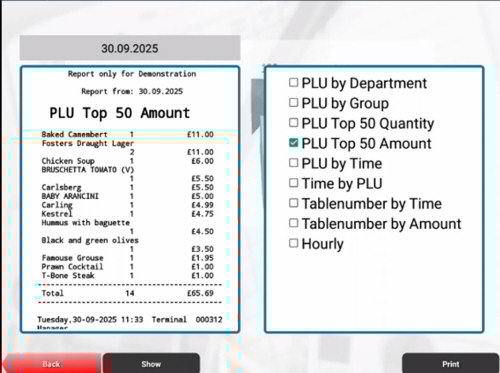 Advanced reporting
Reports allows Ether individual day or range reports.
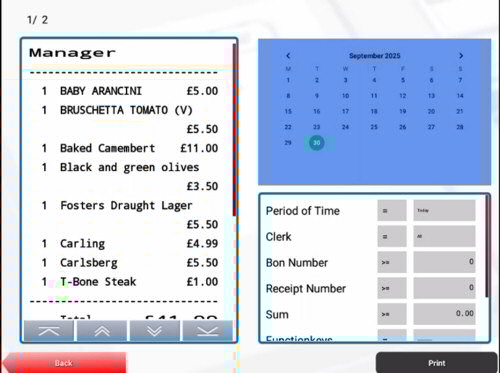
Advanced searching of the journal using multiple criteria, such as date range, transaction amount or even clerk.
Screen Layout
PROPOS EPOS solutions are designed to elevate your point-of-sale experience with sleek, customizable displays and intuitive key layouts. Choose from a variety of vibrant colour themes and five dynamic interface styles to match your brand and workflow. For streamlined operations, activate Kiosk mode to showcase a curated product selection on a single screen—perfect for fast-paced environments where simplicity drives sales.
Mobile Devices Screen
In addition to the standard display, PROPOS offers a sleek Vertical mode tailored for mobile devices—perfectly optimized for smaller screens. This mobile-friendly layout transforms handheld devices into powerful tools for accelerating service speed and enhancing customer engagement, making every interaction smoother and more efficient.
Unlimited Space, Unmatched Control
Never run out of room for your products - PROPOS supports over 99 keyboard levels, each with customizable key sizes to suit your layout preferences. Organize your items by product number, alphabetical order, or even a user-defined sequence for maximum efficiency. Whether you're managing a vast inventory or a dynamic menu, PROPOS keeps everything accessible and intuitive.
Dynamic Keyboard Layout by Department
The POS keyboard layout adapts automatically based on the department selected, streamlining operations and reducing setup time:
Department-driven display
Each department pulls in its associated product list.
Flexible sorting options
- PLU Number: Ideal for structured, numeric product catalogues.
- Alphabetical: Useful for quick scanning and intuitive access.
- Semi-Automatic: Assign priority numbers to buttons to control their screen position manually—perfect for highlighting bestsellers or seasonal items.
Visual Customization for Clarity
Each button on the POS interface can be tailored for fast recognition and ergonomic use:
- Text size: Adjustable for visibility across different screen sizes or lighting conditions.
- Text colour: Assign distinct colours to differentiate categories or urgency (e.g., red for age-restricted items).
- Background colour: Helps group related items visually or highlight promotional products.
- Key position: Manually assign button placement for strategic layout control.
Journal Recall & Review
The system includes multiple Journal-related functions that allow operators to:
- Recall transactions: Instantly access current or historical transaction records to resolve customer queries.
- Review past journals: Retrieve journals from specific dates, useful for audits or tracking down anomalies.
- Reprint lost receipts: If a customer misplaces their receipt, you can reprint it directly from the recalled journal entry.
 Handheld devices
Linking handheld devices to the POS system enables waitstaff to:
- Take orders tableside: Orders are entered directly into the system without needing to walk to a terminal.
- Reduce errors: Real-time entry eliminates miscommunication and handwriting mistakes.
- Speed up service: Orders are instantly routed to kitchen or bar printers, cutting prep time.
- Stay with guests: Waiters spend more time attending to customers rather than running back and forth.
The system supports EFT Links that connect the POS directly to the EFT terminal, ensuring:
- Automatic transfer of sale amount: The total is sent directly to the terminal, removing the need for manual input.
- Reduced human error: Prevents miskeying of amounts, especially during busy periods.
- Faster transactions: Speeds up the payment process and improves customer experience.
- Audit trail consistency: Ensures the EFT receipt matches the POS journal entry for reconciliation.